
Nanonis Mimea Software
The software is the instrument! The Nanonis Mimea™ software is based on the latest developments in programming techniques and signal processing. With its modular architecture and multi-window application all data are acquired simultaneously and transmitted to all modules at all times. Only the windows and functions necessary for the current experiment need to be open compared to an interface with a single window that often will have irrelevant sections displayed consuming valuable screen real estate. The window layout and settings can be stored and recalled at the click of a button for quick experiment switching.
With its track record for reliability, the Nanonis controller can significantly increase day-to-day efficiency and productivity. Also, the modern user interface makes it even more enjoyable to master complex scientific experiments.
For more details, please visit the dedicated Nanonis Mimea™software page
Free STM Simulator
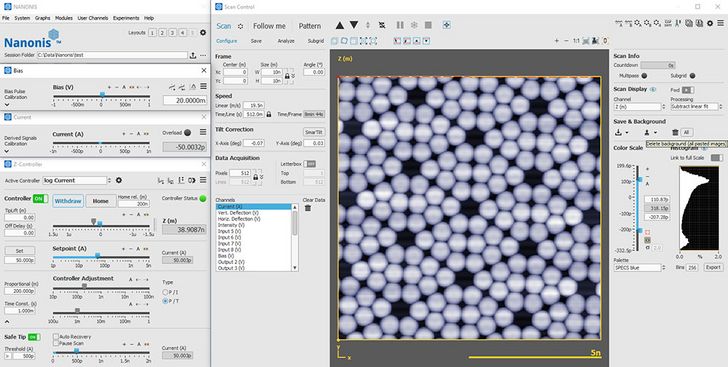
The STM Simulator lets you explore the complete Mimea™ SPM Control System software as if it were connected to a real scanning tunneling microscope (STM) operating on a Si(111) 7x7 surface. A tutorial and online help will guide you step-by-step to your first image and then let you explore the detailed features of the system.
- interactive Z Controller with SafeTip options
- versatile ScanControl with Manipulation and Lithography features. Multiple pass scanning is enabled.
- advanced Spectroscopy: Z spectroscopy, bias spectroscopy, generic spectroscopy - one point, on line, on grid.
- digital lock-in detector up to 4 kHz: dI/dV, (dI/dV)/(I/V)...
- atom tracking: advanced 2D lock-in for drift and tilt correction
- signals monitoring: charts, oscilloscope, FFT, signal history...
It also lets you verify the correct functioning of measurement routines written in the Programming Interface, the scripting module or the TCP interface.
Register and download our free STM Simulator using the link provided below
STM Simulator download
The Nanonis V5e software only runs on 64bit Windows operating systems.
The Nanonis V5e Simulator download link will download a zip file which contains the Nanonis V5e Simulator installer and the Nanonis V5e Runtime Environment. The Nanonis V5e Runtime Environment needs to be installed before running the Nanonis V5e software.
The Nanonis V5e Runtime Environment contains the NI LabVIEW 2019 Runtime Engine, the NI System Configuration Runtime and NI MAX, which are needed to run Nanonis V5e software. The Nanonis V5e Runtime Environment only needs to be installed once, before installing and running the first time Nanonis Software.
Please let us know if you encounter any problems with the installation (contact support@specs-zurich.com).
STM Simulator V5 download
V5 and older Simulators are 32bit applications for the Windows operating system and will not receive further updates.